
Send the right email at the right time — automatically.
Email remains one of the highest-return marketing channels available to any business. You own your list, you control the message and you are not at the mercy of social media algorithms. Zoho Campaigns makes professional email marketing — and email automation — accessible to businesses of any size.
This guide shows you how to set up Zoho Campaigns properly, build automated email journeys and measure what works.
What is Zoho Campaigns?
Zoho Campaigns is Zoho's email marketing software. It lets you design emails, manage mailing lists, segment contacts, run automated workflows, test subject lines and track opens, clicks and revenue. It integrates natively with Zoho CRM, Zoho Forms, Zoho Books and many third-party tools such as Shopify and WordPress.

▶ Watch the video: Overview of Zoho Campaigns (Zoho)
Step 1: Set up your sender details and domain authentication
Deliverability starts before you send a single email:
- Verify your sender address using a business domain (for example, hello@yourcompany.com — not a free Gmail address).
- Authenticate your domain by adding the SPF and DKIM records Zoho provides to your DNS. Add a DMARC record too. Major inbox providers now expect bulk senders to authenticate.
- Add your physical address and unsubscribe link – required by anti-spam laws and by Zoho.
Step 2: Build and import your mailing lists
Only email people who have given permission. Good sources include website sign-up forms, customers who opted in at purchase, event registrations and lead magnets (guides, checklists, webinars).
When importing, map fields such as first name, company, city and source so you can personalise and segment later. Never import purchased lists — they damage your sender reputation and break Zoho's policies.
Step 3: Sync with Zoho CRM
The Zoho CRM integration is where Zoho Campaigns shines:
- Sync leads and contacts automatically using CRM views (for example, "Hot leads in Lagos").
- See email opens, clicks and bounces on each CRM record.
- Trigger CRM actions — like creating a follow-up task — when someone clicks a key link.
Step 4: Segment your audience
Segmentation turns generic newsletters into relevant messages. Segment by:
- Customer type (lead, active customer, past customer)
- Product or service interest
- Location
- Engagement (opened in last 30 days vs inactive)
- Purchase history
Step 5: Design mobile-friendly email templates
Use the drag-and-drop editor or a pre-built template. Best practices:
- One clear goal and one main call-to-action button per email.
- Short paragraphs and scannable headings.
- Your logo, brand colours and a consistent footer.
- Alt text on images.
- Preview on mobile — most emails are opened on phones.
Step 6: Automate with workflows
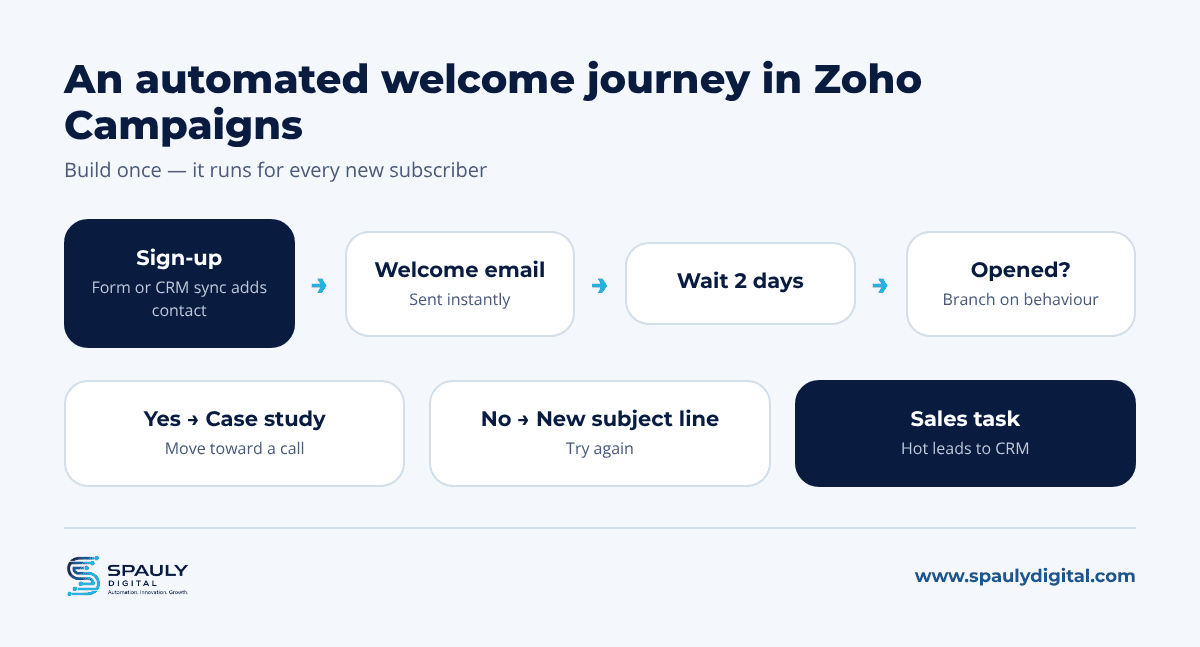
Email automation means the right message goes out at the right time without anyone pressing send. Popular workflows to build in Zoho Campaigns:
- Welcome series – 3 to 5 emails introducing your brand to new subscribers.
- Lead nurturing – educational content that moves leads towards a sales conversation.
- Onboarding – helpful tips for new customers in their first 30 days.
- Re-engagement – win back inactive subscribers or past buyers with a special offer.
- Cross-sell and upsell – recommend related products or services based on what a customer bought.
- Event reminders – confirmations, reminders and follow-ups for webinars and events.
Zoho Campaigns workflows can branch based on behaviour: if someone opens and clicks, send the next step; if not, send a different subject line or move them to another list.
Example: a 5-email welcome series
| Timing | Purpose | |
|---|---|---|
| 1. Welcome | Immediately | Thank them, deliver the promised guide, set expectations |
| 2. Our story | Day 2 | Who you are and why you do what you do |
| 3. Best resource | Day 4 | Your most helpful article, video or case study |
| 4. Social proof | Day 7 | Client results and testimonials |
| 5. Invitation | Day 10 | A clear offer – free consultation, demo or discount |
Each email should be short, valuable on its own and lead naturally to the next.
Step 7: Test before you send
Use A/B testing for subject lines, sender names and content. Send test emails to yourself and colleagues, check every link, and use the spam score checker. Turn on reply tracking so replies land in a monitored inbox.
Step 8: Measure and improve
Key email marketing metrics to watch:
- Open rate – affected by subject line, sender name and deliverability (note that privacy features on some devices inflate opens).
- Click-through rate – the best measure of content relevance.
- Conversion rate – how many clicks led to a booking, purchase or form submission.
- Bounce rate and unsubscribes – signals of list health.
Review results monthly, and remove persistently inactive contacts to protect deliverability.
Common email marketing mistakes
- Sending without domain authentication.
- Emailing everyone the same message.
- Too many images and not enough text.
- No clear call to action.
- Sending too often — or so rarely people forget who you are.
FAQs
Is Zoho Campaigns free? Zoho Campaigns offers a free plan for small lists, with paid plans based on subscribers or emails sent. It is also included in Zoho One and in the Zoho Marketing Plus bundle.
Zoho Campaigns vs Mailchimp: which is better? Mailchimp is popular and easy to use. Zoho Campaigns is usually more affordable and integrates far more deeply with Zoho CRM, making it the better choice if you use Zoho.
Can Zoho Campaigns send emails automatically from CRM? Yes. CRM changes can add contacts to lists and trigger Campaigns workflows.
Let us build your email marketing engine
Spauly Digital designs email templates, builds automated journeys and connects Zoho Campaigns to your CRM — for welcome series, cross-sell and upsell campaigns, customer re-engagement and more. If you want email marketing that runs in the background and brings in revenue, we can help.
Need help with Zoho or your business systems?
Book a free consultation with Spauly Digital, a Zoho Authorized Partner. We design, build and support CRM, automation, website and digital marketing solutions for growing businesses.
Book a free consultationwww.spaulydigital.com · info@spaulydigital.com · 08145693491